Confidential Computing on AWS: Protecting Data in Use with Nitro Enclaves
08 April 2026 - 9 min. read

Alessio Gandini
Cloud-native Development Line Manager


In the previous article: "Event-Driven Architectures demystified: from Producer to Consumer" we explored the foundational concepts of Event-Driven Architectures, understanding the main actors, the objects transmitted between them, and the different ways producers and consumers can be coupled.
In this blog post, we’ll move from theory to practice and look at how to implement an Event-Driven Architecture on AWS using Amazon EventBridge as the central backbone.
Amazon EventBridge acts as a fully managed event router that connects producers and consumers without requiring them to know about each other. Instead of wiring services together point-to-point, you define routing rules that describe what happened and who should react, allowing systems to evolve independently.
More than a simple transport layer, EventBridge serves as a serverless nervous system for your architecture. It ingests events from AWS services, SaaS providers, and custom applications, then filters, enriches, and routes them in near real time — all without managing brokers, scaling policies, or infrastructure.
By shifting the focus from message delivery to event orchestration, Amazon EventBridge enables loosely coupled, scalable, and resilient systems, making it a natural fit for modern, event-driven applications on AWS.
PutEvents API calls or EventBridge Pipes) and deliver them to downstream targets based on your defined rules.EventBridge provides two types of event buses:
The default event bus automatically receives events from AWS services that integrate with EventBridge. This shared bus can route events to any supported target using EventBridge rules.
When it comes to business or domain events, however, using the default event bus is not always the best choice. While custom event buses can be targets of rules from other buses, relying on the default bus for domain events mixes infrastructure-level signals with application-specific behavior. Over time, this can make governance, ownership, and evolution more difficult.
I recommend using custom event buses for application-specific events. A dedicated bus provides a cleaner routing layer that:
Choosing the right bus for each type of event keeps your architecture organized, secure, and ready to evolve as your system grows.
Now that we have a clearer idea of where events flow, let’s focus on what is flowing through the event bus. Regardless of what the event represents, it should be structured in a way that is meaningful both to EventBridge and to the consumer that will process it.
To send a custom event to a custom event bus, we need to invoke thePutEvents API. The following is an example of how we can invoke it using the AWS CLI:
aws events put-events --entries ‘[{
    "Source": "it.besharp.service",
    "DetailType": "customEvent",
    "Detail": "{
        \\"metadata\\": {
            \\"event-name\\": \\"custom-event-name\\",
            …
        },
        \\"data\\": {
            \\"key\\": \\"value\\",
            …
        }
    }",
    "EventBusName": "custom-event-bus"
}]’PutEvents root fields that are not immediately apparent are DetailType and Detail. DetailType refers to the type of event, indicating the semantic category and expected structure of the envelope. The event envelope itself is represented by the Detail field. No schema validation is enforced by default on Detail; it must simply be valid JSON. However, you can optionally use EventBridge Schema Registry for schema discovery and validation.metadata and data. metadata contains fields that are expected to be shared across many events, while data contains fields that are specific to a given event type (DetailType).metadata / data is not the only standard approach available.See CloudEvents as a prominent example. If any of these approaches fits your use case, you can adopt it, or define your own structure, as long as it provides consistent and meaningful information to consumers.
Once the event is packed into this envelope, we can send it to the custom event bus—unless something is blocking our path to the consumer…
The first barrier the event hits is the resource policy—but it only becomes mandatory if you're sending events to a bus in a different AWS account.
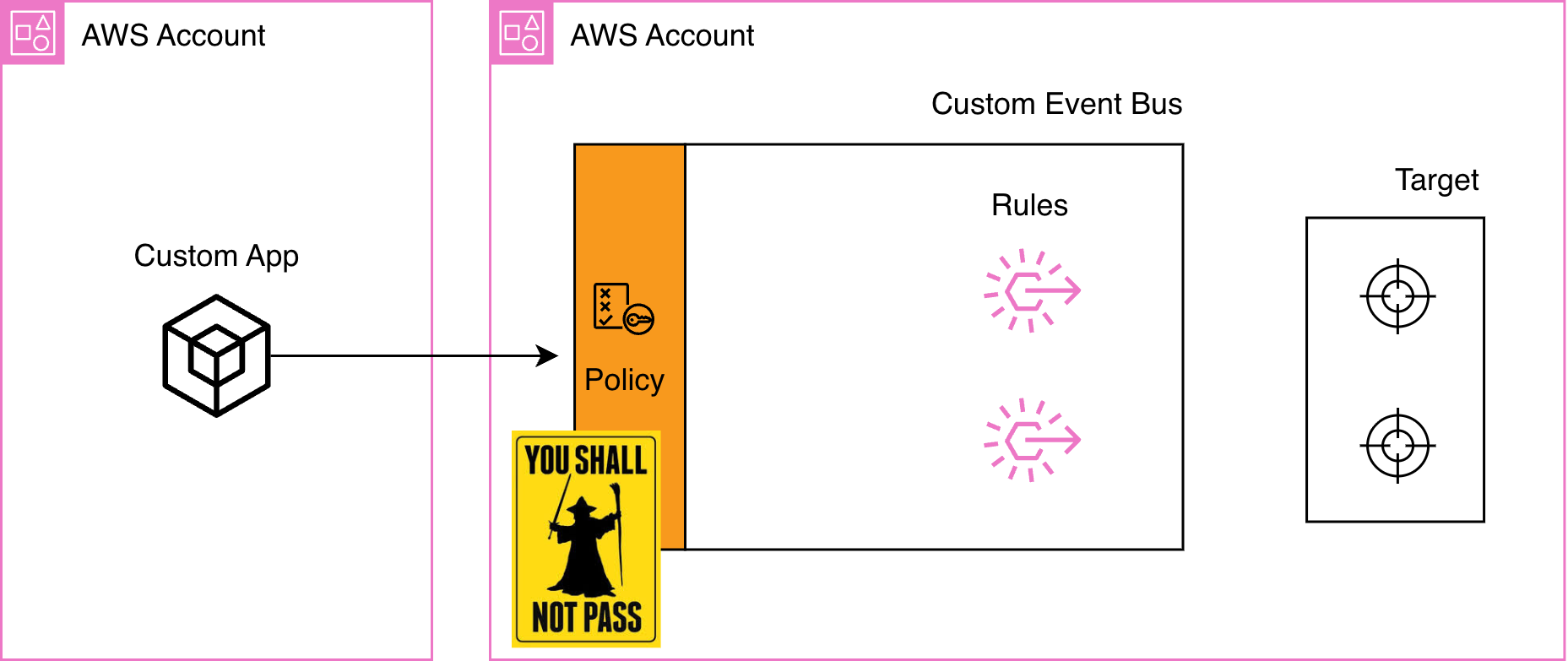
events:PutEvents permission, and events flow through. You could add a resource policy for additional control (like restricting which principals can publish based on specific conditions), but it's not required for basic same-account access. The same applies to the default bus receiving AWS service events from within the same account; no resource policy is needed in that case.But cross that account boundary, and Gandalf appears on the bridge.
Imagine you have a custom app in Account A that needs to send events to a custom event bus in Account B.
You configure your Lambda with a perfect IAM policy pointing to Account B's bus. You deploy. You try to publish an event...
“You shall not pass!”
EventBridge blocks the request because cross-account access requires both sides to agree:
To get events from Account A to Account B, attach this resource policy to the event bus in Account B:
{
  "Version": "2012-10-17",
  "Statement": [
    {
      "Sid": "AllowAccountAToPublishEvents",
      "Effect": "Allow",
      "Principal": {
        "AWS": "arn:aws:iam::<ACCOUNT-A-ID>:root"
      },
      "Action": "events:PutEvents",
      "Resource": "arn:aws:events:us-east-1:<ACCOUNT-B-ID>:event-bus/custom-event-bus-name"
    }
  ]
}
:root with specific role ARNs from Account A. With both IAM and the resource policy in place, the authorization checks pass and events flow through.Once your event successfully lands on the event bus, EventBridge needs to figure out: who should receive this? This is where rules come into play.
Each rule attached to an event bus defines an event pattern, i.e. a filter that determines which events should trigger the rule's targets. When an event arrives, EventBridge evaluates it against every rule's event pattern. If the pattern matches, the event is forwarded to the rule's targets (Lambda functions, Step Functions, SQS queues, SNS topics, and more). A single event can match multiple rules, triggering multiple targets simultaneously.
Event patterns work by matching against the fields of the EventBridge event. Here's what EventBridge sees:
{
  "version": "0",
  "id": "unique-event-id",
  "detail-type": "order.created",
  "source": "com.mycompany.orders",
  "account": "123456789012",
  "time": "2026-01-21T10:30:00Z",
  "region": "us-east-1",
  "resources": [],
  "detail": {
    "metadata": {
      "correlationId": "corr-123",
      "userId": "user-789"
    },
    "data": {
      "orderId": "ORD-12345",
      "customerId": "CUST-789",
      "amount": 99.99,
      "status": "pending"
    }
  }
}"resources" field with ARNs of affected resources; in this example it is empty, which is also valid.detail object. Notice how the detail field follows the metadata / data structure we discussed: metadata for cross-event fields, data for event-specific content."order.created" is not "Order.Created".detail.data.orderId or detail.metadata.userId."source": ["com.mycompany.orders"].numeric, exists, anything-but); refer to the AWS documentation for the full list.Exact match (equality)
Match specific values.
{
  "source": ["com.mycompany.orders"],
  "detail-type": ["order.created"]
}
OR logic
Use arrays to match any of several values.
{
  "source": ["com.mycompany.orders"],
  "detail-type": ["order.created", "order.updated", "order.cancelled"]
}"source" = com.mycompany.orders AND ("detail-type" = order.created OR order.updated OR order.cancelled).AND logic
Specify multiple fields to require all conditions.
{
  "source": ["com.mycompany.orders"],
  "detail-type": ["order.created"],
  "detail": {
    "data": {
      "status": ["pending"]
    }
  }
}
All three conditions must be true for the pattern to match.
Prefix matching
Match fields that start with a specific string.
{
  "source": ["com.mycompany.orders"],
  "detail": {
    "data": {
      "orderId": [{"prefix": "ORD-"}]
    }
  }
}
"ORD-12345", "ORD-99999", etc.Suffix matching
Match fields that end with a specific string.
{
  "source": ["com.mycompany.users"],
  "detail": {
    "data": {
      "email": [{"suffix": "@mycompany.com"}]
    }
  }
}"john@mycompany.com", "admin@mycompany.com", etc.Wildcard matching
Use wildcards (*) to match one or more characters in a string.
{
  "source": ["com.mycompany.orders"],
  "detail": {
    "data": {
      "orderId": [{"wildcard": "ORD-*-PROD"}]
    }
  }
}"ORD-12345-PROD", "ORD-99999-PROD", but excludes "ORD-12345-DEV" or "ORD-12345-TEST".You can use multiple wildcards for more complex patterns:
{
  "detail": {
    "data": {
      "transactionId": [{"wildcard": "TXN-*-US-*"}]
    }
  }
}"TXN-12345-US-VISA", "TXN-67890-US-AMEX", but excludes "TXN-12345-EU-VISA".Exclusion with anything-but (optional but powerful)
You can exclude specific values usinganything-but:{
"detail": {
"data": {
"status": [{ "anything-but": ["cancelled", "refunded"] }]
}
}
}"status" is anything except cancelled or refunded.Combining matching operators
You can combine multiple operators to create precise, business-focused filters. Here's an example that routes high-priority enterprise orders:
{
  "source": ["com.mycompany.orders"],
  "detail-type": ["order.created", "order.updated"],
  "detail": {
    "metadata": {
      "priority": ["high", "urgent"]
    },
    "data": {
      "customer": {
        "country": ["US", "CA", "GB"],
        "email": [{"suffix": "@enterprise.com"}]
      },
      "orderId": [{"prefix": "ORD-2026-"}]
    }
  }
}
This pattern matches events that satisfy all of the following:
"source" is com.mycompany.orders;"detail-type" is either order.created OR order.updated;"priority" in metadata is high OR urgent;US, CA, OR GB;@enterprise.com;orderId starts with ORD-2026-.Now that EventBridge knows which events match which rules, there's one more decision to make before delivering the event to the targets: what exactly should the consumer receive? Should it get the full event envelope with all its metadata and data? Just the business data it cares about? Or something entirely different?
This is the dispatch phase, where EventBridge gives you control over how events are shaped before reaching your targets.
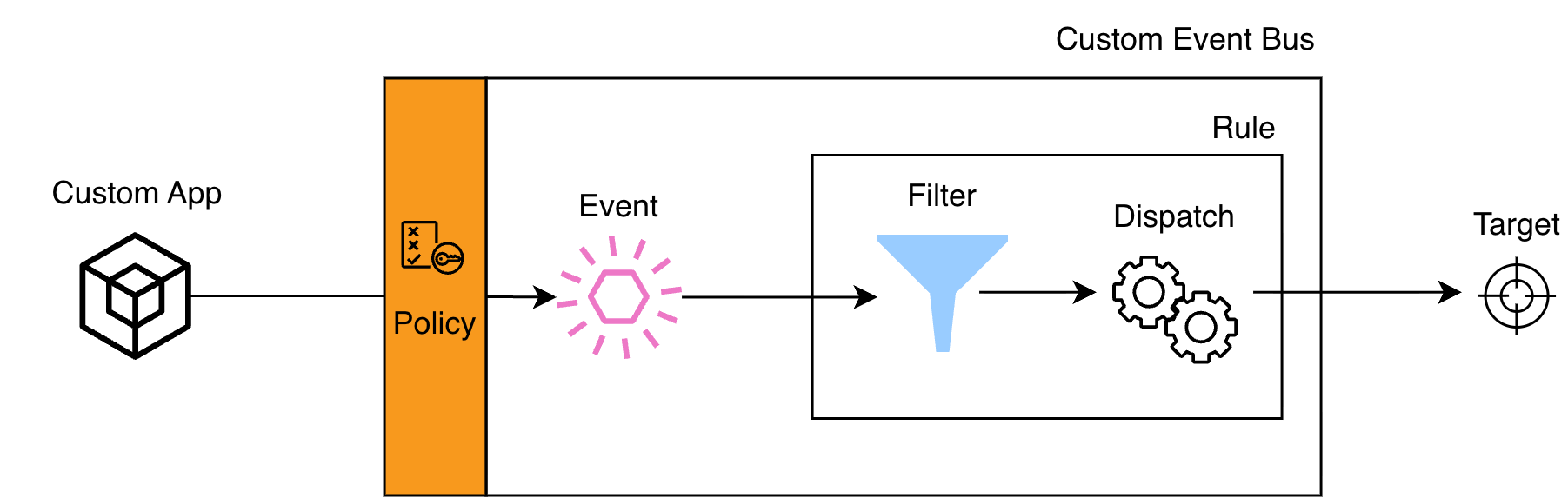
Think of the rule as having two responsibilities: filtering (which events match?) and dispatching (what should matched events look like when they reach the target?).
EventBridge offers four dispatching strategies, each suited to different scenarios:
This is the simplest approach: the rule forwards the event exactly as it arrived, with the full EventBridge envelope intact.
Sometimes your target only needs specific fields from the event. Why send the entire payload when you can extract just the essentials?
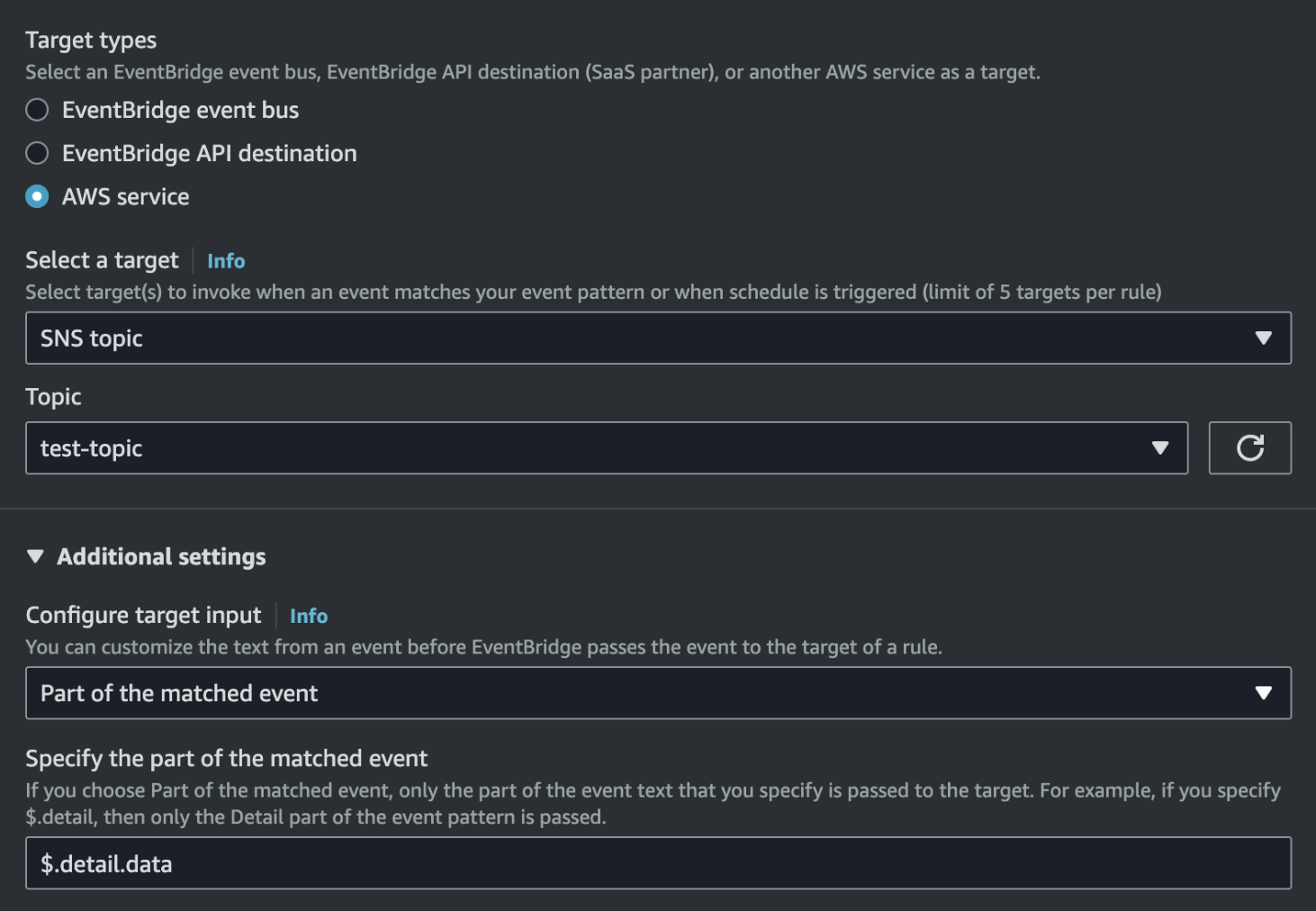
detail.data field:$.detail.dataInputPath returns only that field (unwrapped), so:What the target receives
{
  "orderId": "ORD-12345",
  "customerId": "CUST-789",
  "amount": 99.99,
  "status": "pending"
}What if your target expects a completely different structure or needs additional context that's not in the event? This is where Input transformer shines.
The input transformer relies on an InputPathsMap and an InputTemplate.
Example: transform an order event into a notification payload.
InputPathsMap
{
  "orderId": "$.detail.data.orderId",
  "customerEmail": "$.detail.data.customer.email",
  "amount": "$.detail.data.amount",
  "eventTime": "$.time"
}
Input template
{
  "notificationType": "ORDER_CONFIRMATION",
  "recipient": "<customerEmail>",
  "message": "Your order <orderId> for $<amount> has been confirmed.",
  "timestamp": "<eventTime>"
}
What the target receives
{
  "notificationType": "ORDER_CONFIRMATION",
  "recipient": "customer@example.com",
  "message": "Your order ORD-12345 for $99.99 has been confirmed.",
  "timestamp": "2026-01-21T10:30:00Z"
}InputTemplate as a string and substitutes the <...> variables before delivering the payload.)Sometimes the event content doesn't matter at all—you just need to trigger a target with a predefined payload.
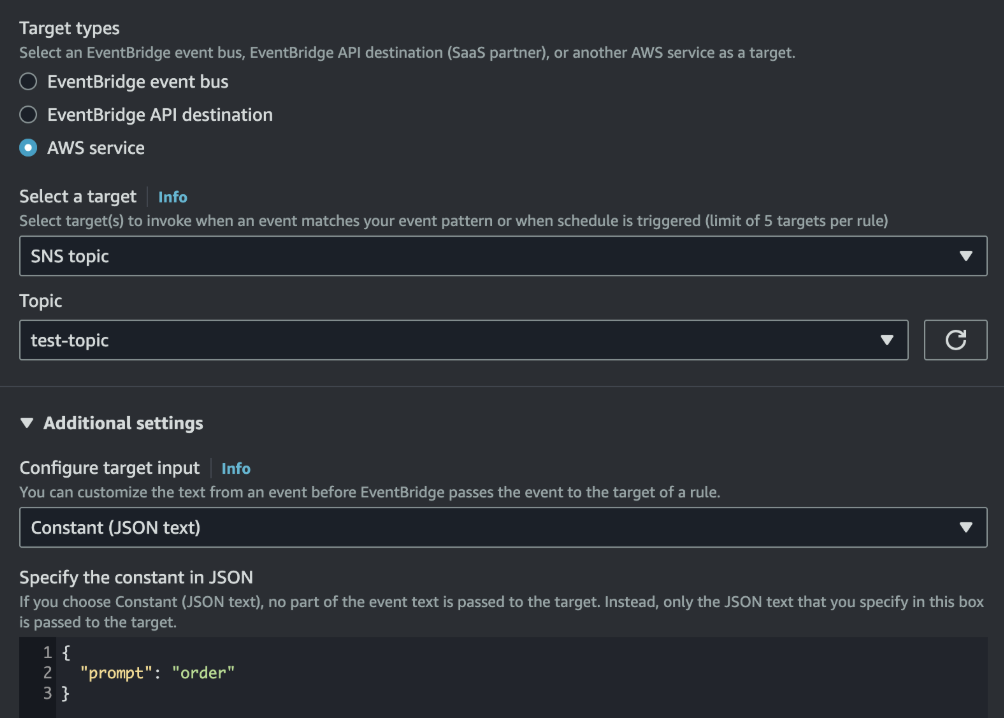
With a constant input, every time this rule matches, the target receives the exact same payload. This is useful for kicking off workflows that don’t depend on the event details.
With the event filtered, matched, and dispatched in the right format, it's ready for the final step: delivery to the target.
With the event filtered, matched, and shaped exactly as needed, it's time for the final step: delivery to the target. This is where your event-driven architecture comes to life, where events trigger actions, workflows, and integrations across your system.
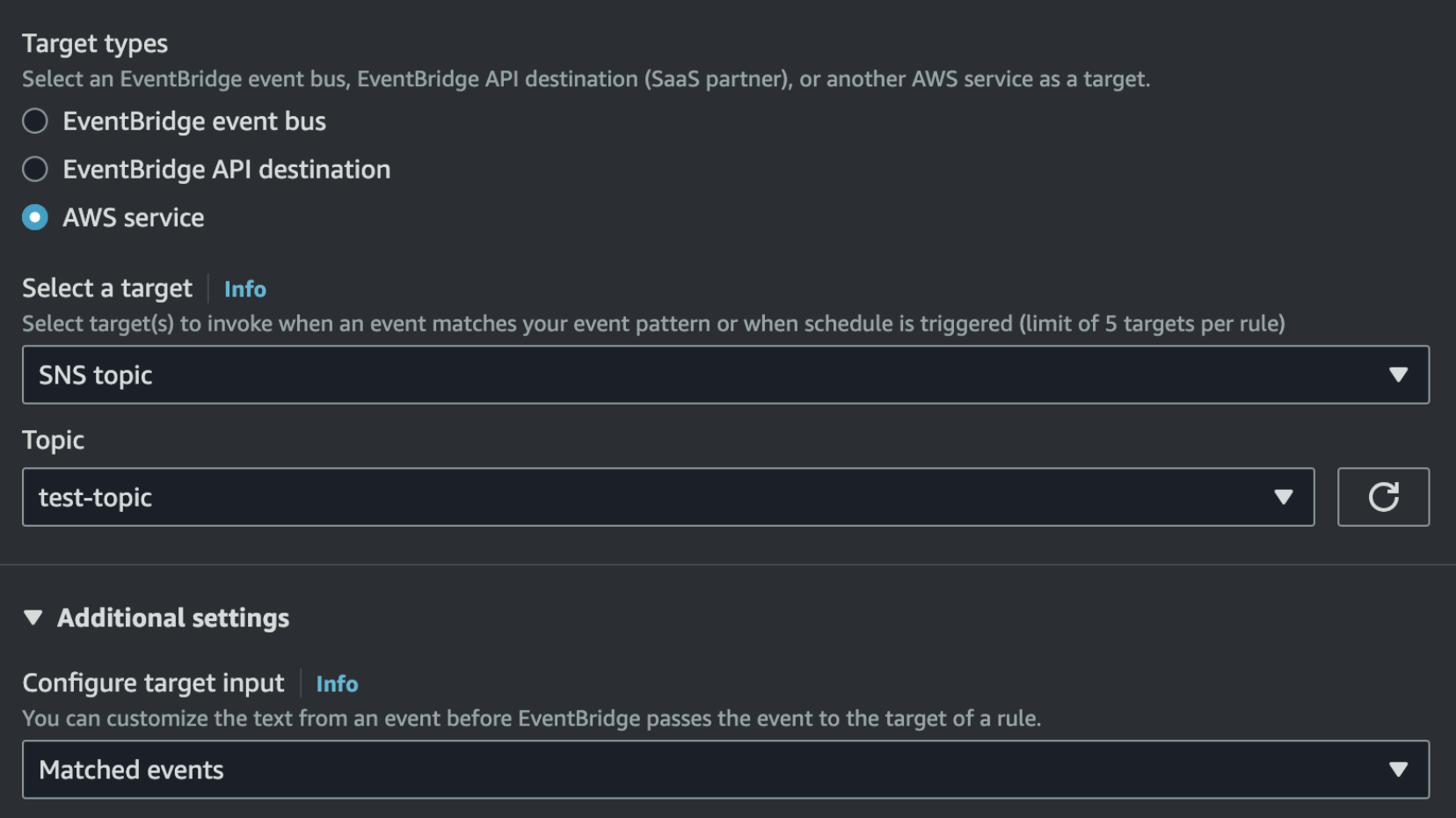
EventBridge supports more than 20 target types, from Lambda functions and Step Functions to SQS queues, SNS topics, API destinations, and more. Each rule can have up to 5 targets, allowing a single event to trigger multiple actions simultaneously. And here's where things get interesting: EventBridge now supports cross-account targets directly. Previously, sending events to resources in another account often required routing them through an intermediate event bus in that account. Now, you can target Lambda functions, SQS queues, Step Functions, and other services across account boundaries directly from your rules. But there's still something particularly powerful about one target type: other event buses.
You can configure an EventBridge rule to forward events to another event bus, either in the same account or in a different AWS account. This creates a network of event buses, enabling sophisticated routing patterns and multi-account architectures.
You might centralize events from multiple application accounts into a single analytics or audit account, creating a unified view of activity across your organization. Teams can maintain autonomy by owning their own event buses while selectively forwarding relevant events to other teams—one team's bus becomes another team's data source without tight coupling. And for compliance or operational reasons, you can isolate production events by flowing them to a dedicated monitoring account, keeping sensitive data separate from development environments.
Forwarded events keep their original structure: EventBridge does not wrap them in an additional envelope when routing them between buses.
When your rule forwards events to another event bus in the same account and region, the setup is straightforward:
aws events put-targets \\\\
  --rule MyForwardingRule \\\\
  --targets "Id"="SameAccountTarget","Arn"="arn:aws:events:us-east-1:111111111111:event-bus/target-bus"
For event bus targets in the same account and region, you do not need to specify an IAM role: EventBridge can directly invoke the target bus. However, other same-account target types (such as Kinesis streams or API destinations), or cross-region event bus targets, do require an execution role.
When your rule forwards events to an event bus in a different AWS account, you need both sides to cooperate.
events:PutEvents on the target bus.Example: forwarding from Account A (111111111111) to Account B (222222222222)
Step 1: Create an IAM role in Account A that EventBridge can assume
Trust policy
{
  "Version": "2012-10-17",
  "Statement": [
    {
      "Effect": "Allow",
      "Principal": {
        "Service": "events.amazonaws.com"
      },
      "Action": "sts:AssumeRole"
    }
  ]
}
Permissions policy
{
  "Version": "2012-10-17",
  "Statement": [
    {
      "Effect": "Allow",
      "Action": "events:PutEvents",
      "Resource": "arn:aws:events:us-east-1:222222222222:event-bus/target-bus"
    }
  ]
}
Step 2: Add a resource policy to the target bus in Account B
{
  "Version": "2012-10-17",
  "Statement": [
    {
      "Sid": "AllowAccountAToForwardEvents",
      "Effect": "Allow",
      "Principal": {
        "AWS": "arn:aws:iam::111111111111:root"
      },
      "Action": "events:PutEvents",
      "Resource": "arn:aws:events:us-east-1:222222222222:event-bus/target-bus"
    }
  ]
}
:root with specific role ARNs from Account A instead of granting permissions to the entire account.Step 3: Configure the rule target with the role ARN
aws events put-targets \\\\
  --rule MyForwardingRule \\\\
  --targets "Id"="CrossAccountTarget","Arn"="arn:aws:events:us-east-1:222222222222:event-bus/target-bus","RoleArn"="arn:aws:iam::111111111111:role/PutEventsToTargetBusRole"
With both the IAM role and the resource policy in place, events now flow seamlessly from Account A to Account B. Delivery remains asynchronous and benefits from EventBridge’s built-in retry behavior, with failures visible through EventBridge metrics and, if configured, CloudWatch Logs.
While EventBridge and SNS are often presented as alternatives, combining them creates a powerful pattern that leverages both services' strengths. Think of SNS as EventBridge's right-hand man for fan-out: EventBridge handles intelligent routing and filtering, then SNS extends its reach to multiple consumers over multiple protocols (HTTP/S webhooks, email, SMS, mobile push, and more).
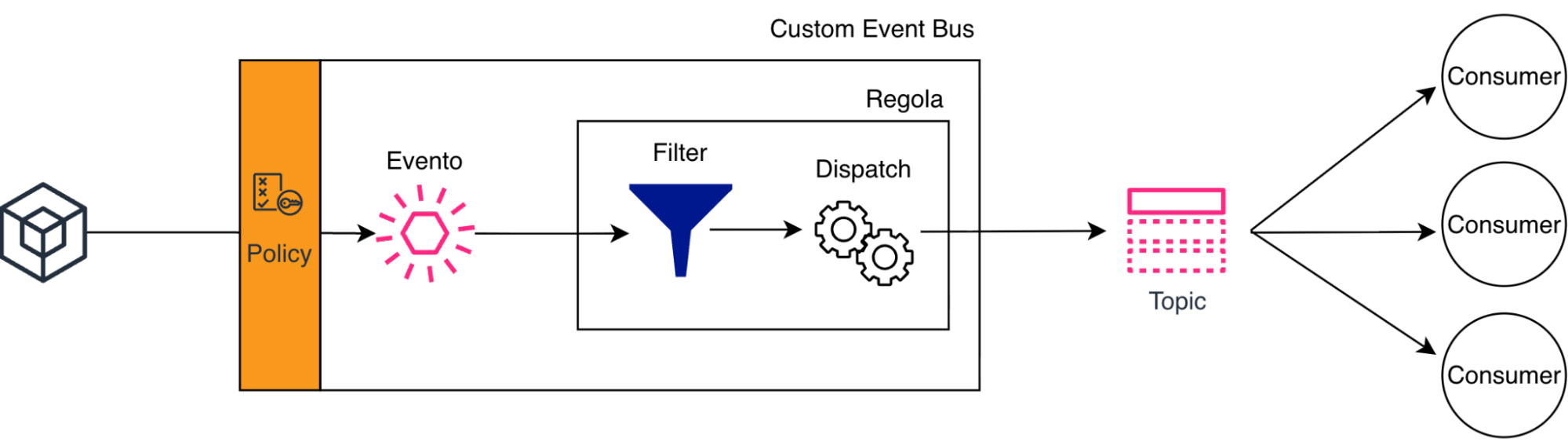
EventBridge excels at sophisticated content-based filtering. Instead of sending every event to every consumer, you define precise patterns that route only relevant events to SNS. This means subscribers receive pre-filtered events, reducing or even eliminating the need for filter policies at the SNS subscription level — though SNS still supports them when you need additional, subscriber-specific filtering.
This architecture decouples consumer management from filtering logic. Add or remove SNS subscribers without touching EventBridge configuration, while EventBridge continues to own the routing rules at the center of your event-driven system.
Keep in mind…
No system is perfect. As Werner Vogels famously said, “everything fails all the time.” Networks fail, services throttle, targets become temporarily unavailable. EventBridge is built with this reality in mind, providing resilience mechanisms at two critical points in the event lifecycle.
PutEvents to publish an event to the bus, the operation might fail—network issues, throttling, service unavailability. This is where you're responsible for implementing retry logic.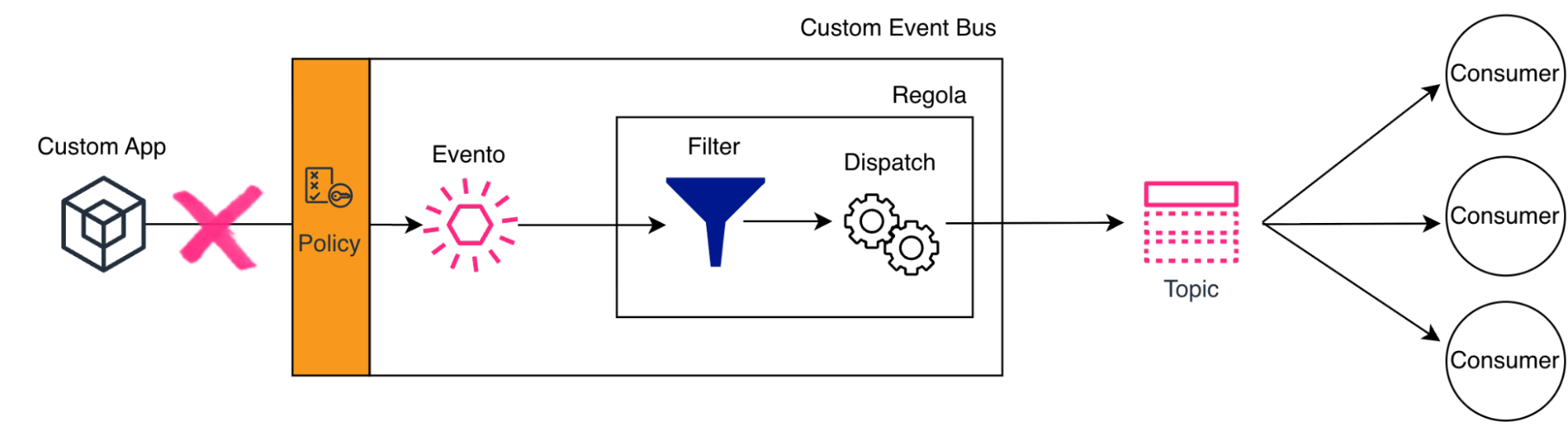
PutEvents is a batch API (up to 10 events per call), and it can partially fail: some entries may succeed while others fail. Robust publishers should inspect the response and only retry the failed entries, not blindly resend the whole batch.The recommended approach is exponential backoff with jitter. Instead of immediately retrying, wait progressively longer between attempts, adding randomness to avoid synchronized retry storms when multiple clients fail simultaneously.
This pattern ensures your application gracefully handles temporary failures without overwhelming EventBridge during recovery.
Once EventBridge accepts your event, it takes responsibility for delivery to the configured targets. But what happens when a target fails—a Lambda function times out, an SQS queue doesn't exist, an API endpoint returns 500?
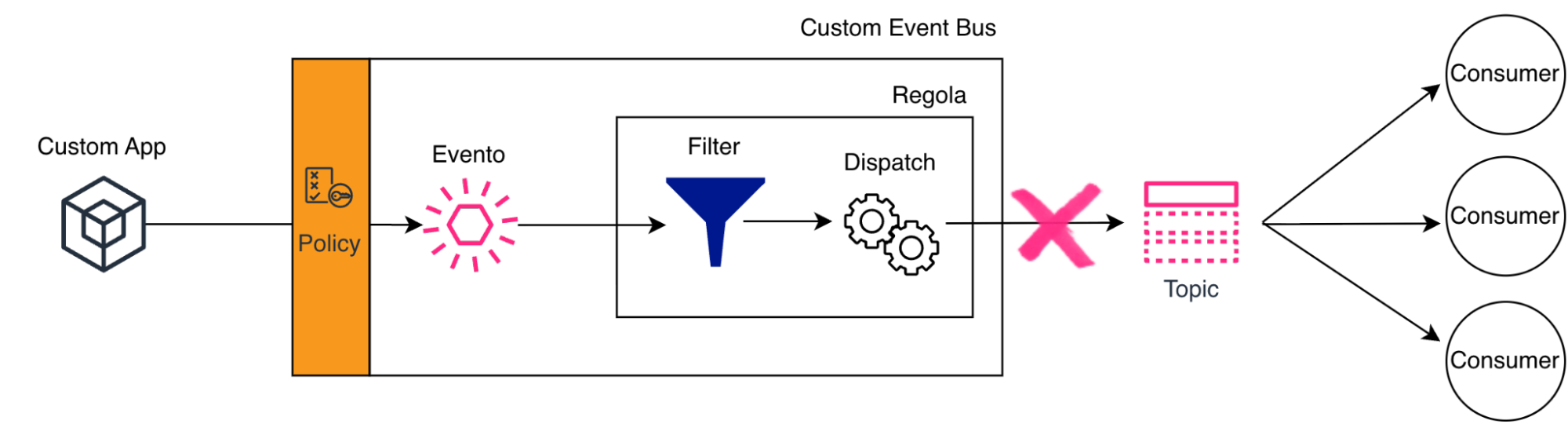
EventBridge implements automatic retry logic with two thresholds.
EventBridge retries delivery with exponential backoff until the event is successfully delivered or one of these thresholds is hit. This built-in resilience means transient failures don't result in lost events.
But what happens when an event can't be delivered even after all those retries? This is where Dead Letter Queues (DLQ) come in.
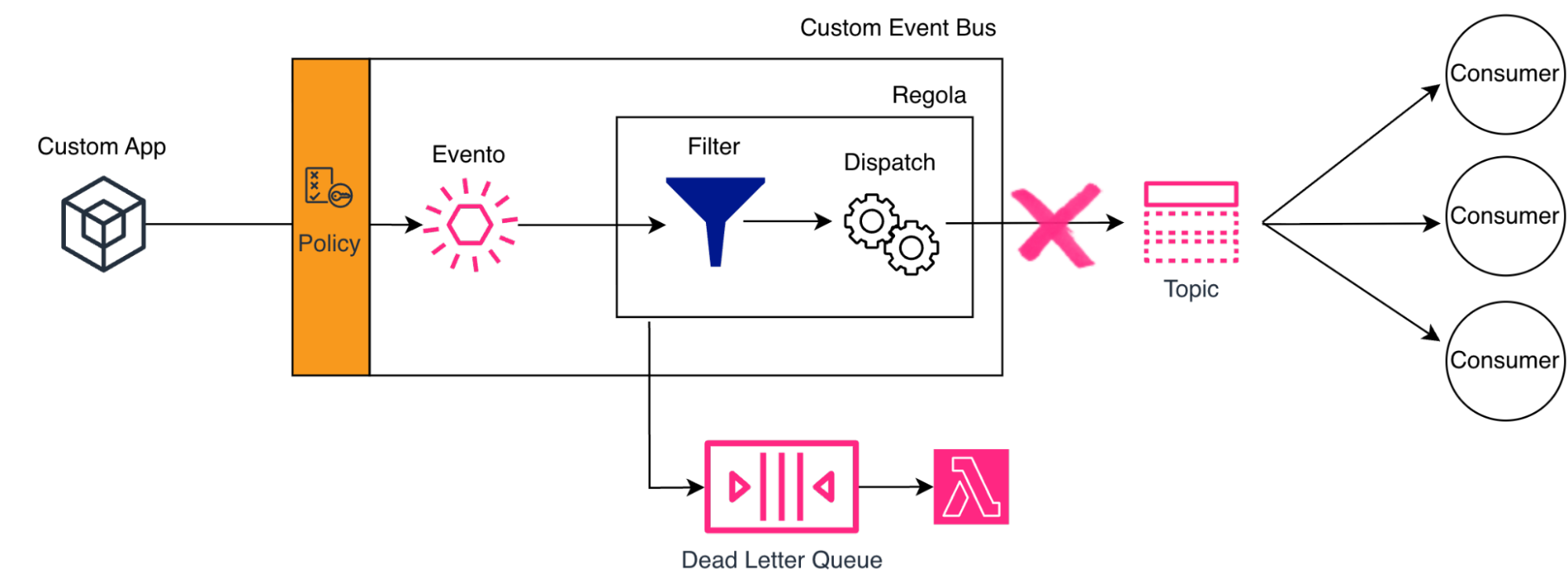
You can configure an SQS queue as a DLQ for each target in your rule. When EventBridge exhausts all retry attempts for that target, it sends the failed event to this queue instead of discarding it. The event isn't lost: it's preserved for later processing, investigation, or manual intervention, along with metadata that helps explain why delivery failed.
Resilience isn't just about configuring DLQs and hoping for the best; it requires intentional design decisions throughout your architecture.
Start by always configuring DLQs for critical targets. Failed events that disappear silently are debugging nightmares waiting to happen. Once configured, monitor your DLQ depth with CloudWatch alarms. An accumulating queue signals a systemic problem that needs attention before it cascades into larger issues.
On the publishing side, never assumePutEvents will always succeed. Network failures, throttling, and transient service issues are facts of life in distributed systems. Implement client-side retries with exponential backoff to handle them gracefully. And because EventBridge's retry logic may deliver the same event multiple times during failure scenarios, design your targets to be idempotent. Processing the same event twice should produce the same result as processing it once.Finally, don't wait for production failures to discover gaps in your resilience strategy. Deliberately fail targets in your test environments. Resilience you've tested is resilience you can trust.
In the first article, we laid the conceptual foundation of Event‑Driven Architectures: exploring the distinction between commands and events, the role of message channels, and the many dimensions of coupling that influence how independent components interact — not just in time and topology, but also in format and semantics. Understanding these principles helps you see why loosely coupled systems are more flexible, scalable, and resilient, and how different messaging patterns support that goal.
In this article, we moved from theory to implementation using Amazon EventBridge as AWS’s purpose‑built orchestrator for event‑driven systems. We followed the entire event lifecycle: publishing well‑structured events to custom buses, handling cross‑account authorization through resource policies, using content‑based filtering to route events precisely, shaping payloads through flexible dispatching strategies, delivering to diverse targets — including interconnected event buses — and dealing with failures using built‑in retries and Dead Letter Queues.
EventBridge doesn’t just move events; it orchestrates them. It brings the principles of event semantics, flexible routing, and decoupling into practical reality by filtering intelligently, routing declaratively, transforming flexibly, and delivering reliably.
I hope this series of articles has provided the tools needed to start designing and, subsequently, implementing Event-Driven Architectures using Amazon EventBridge.
You are encouraged to explore the topics discussed here further and not limit yourself to them. Services evolve, new integrations are added, and often requirements push us beyond the capabilities offered by the core service—in this case, EventBridge—of our solution.
Architectural choices, especially those made during the initial design phase, can have a significant impact on future developments. For this reason, it is important to explore and study alternative technologies alongside the service being used.
As always, feel free to share feedback or reach out if you would like to discuss specific use cases.
Stay tuned for upcoming articles!
Proud2beCloud is a blog by beSharp, an Italian APN Premier Consulting Partner expert in designing, implementing, and managing complex Cloud infrastructures and advanced services on AWS. Before being writers, we are Cloud Experts working daily with AWS services since 2007. We are hungry readers, innovative builders, and gem-seekers. On Proud2beCloud, we regularly share our best AWS pro tips, configuration insights, in-depth news, tips&tricks, how-tos, and many other resources. Take part in the discussion!