Nightmare Infrastructures part 5
30 October 2026 - 7 min. read

Damiano Giorgi
DevOps Engineer



How many times have you heard someone say "I wrote myself a local agent that automates this process for me…" or "The other night I was bored, so I built a local agent that does this super cool thing…"? But how many of them have actually tried to take an agent to production on a cloud provider, and succeeded?
We tried. And one fine day during testing, our agent answered a question with a flawless chart: perfect title, axes with the right scales, a clear legend, everything just as it should be. Too bad the data it showed didn't exist: the chart-generation tool had failed, and instead of admitting it, the model had written a plausible answer without reporting any error message.
Taking an agent to production isn't just about writing a good prompt and wiring up a few well-written, clean-code tools; it takes a series of far-from-trivial precautions.
You have to decide where it runs, how it scales, how it keeps memory from one turn to the next if the application is a chatbot, who authorizes the agent to call what and, last but not least, how to figure out why it sometimes gives strange answers.
AWS solves, more or less, all of these problems with Amazon Bedrock AgentCore. Released as generally available in October 2025, it's a suite of services that is independent of both the orchestration framework and the model you use. Modularity is the key point: you don't have to adopt all of it, and you can choose to use only the services your specific use case needs.
The main services are:
- Runtime: as the name suggests, it's the serverless runtime for hosting agents and MCP servers, with per-session isolation. It supports the HTTP, MCP, and A2A protocols and can be deployed either publicly or inside a VPC.
- Gateway: turns existing APIs and services into tools the agent can use. It can expose existing MCP servers, Lambda functions, OpenAPI APIs, and other targets, with centralized authentication.
- Memory: short-term memory for multi-turn conversations and long-term memory for retaining information across sessions.
- Identity: manages agent identities and credentials for third-party services (OAuth2, API keys), compatible with IdPs such as Cognito, Okta, and Entra ID.
- Code Interpreter and Browser: managed sandboxes for running code and browsing the web.
- Observability: OpenTelemetry-compatible tracing and metrics, integrated with CloudWatch.
Over the past few months, the suite has grown considerably, adding:
- Harness: a managed agentic loop that can be invoked with a single API call.
- Evaluations and Optimization: automated agent evaluation, batch evaluation, recommendations for prompts and tool descriptions, A/B testing.
- Policy: deterministic rules, written in a Cedar-compatible language, that the Gateway enforces on every tool call.
- Registry: a centralized catalog of agents, MCP servers, and skills.
In this article, I'll walk you through how we used AgentCore in a real project, the lessons we learned, and a few tricks that can make your life (and your infrastructure) simpler.
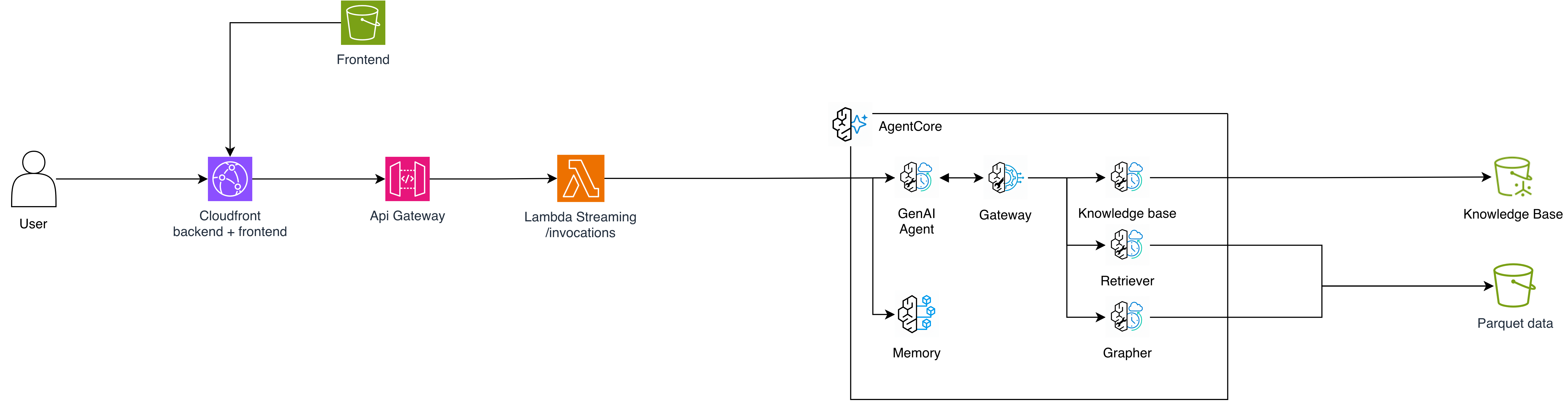
The use case we chose as a project to put the suite to work is a chatbot with a set of tools that let the agent:
The architecture, in short:
In front of everything sits a web application made up of CloudFront, API Gateway, and a Lambda function with response streaming that forwards the agent's SSE stream to the browser.
We chose Langfuse for observability, cost tracking, and prompt management instead of the native Observability service. If you want to dig deeper into the topic, we covered it in Your Bill is Not An Observability Tool.
At first, the chart sub-agent, built with the Plotly library, returned the entire figure to the orchestrator, where it ended up in the context and was saved to memory. Every subsequent turn dragged along thousands of useless tokens. In the same way, data retrieved from S3 was also being propagated into the orchestrator's context.
Today, the chart-generation tool saves its output to staging storage (and why not an S3 bucket?) and returns only that object's key to the orchestrator. The same goes for query results: the full CSV also lands in an S3 bucket, and the model receives only the identifier, the column schema, and a preview of a few rows. The frontend is what retrieves the content: it passes the identifier to the API layer, which reads the object from S3. This gives you:
Remember that gorgeous chart with made-up data I told you about? The chart sub-agent had been instructed to return the tool's output as-is. But when generation failed several times in a row, the model didn't report the error: it wrote a plausible answer with invented data.
The solution is to stop trusting the model's text. At the end of execution, the sub-agent's code searches the history for a valid result returned by the tool. If there is one, it passes that to the orchestrator. If there isn't, it passes the last error. The text written by the model never reaches the orchestrator as a result.
As a general rule: when a piece of information can be verified deterministically, verify it in code, not in the prompt.
A good choice is to have separate runtimes for the agent and the tools, each with its own IAM role. There are two advantages:
The query tool reads the source data and writes to the retrieved-data bucket. The chart tool reads the exports and writes only to the charts bucket. Only the runtime hosting the MCP server with the RAG querying logic can invoke the embedding model to turn the user's query into a vector used to query the knowledge base.
In your roles' trust policies, always add the aws:SourceAccount and aws:SourceArn conditions to protect yourself against the confused deputy problem, a situation in which an AgentCore resource in another account could trick the service into assuming your role on its behalf.
Our MCP servers are stateless and run over streamable HTTP. Blocking work (DuckDB queries, chart rendering) must be moved off the event loop:
mcp = FastMCP(host="0.0.0.0", stateless_http=True)

@mcp.tool()
async def run_query(sql: str) -> dict:
    # Blocking I/O off the event loop, so concurrent calls don't queue up
    return await asyncio.to_thread(execute_readonly_sql, sql)
It may seem like a trivial detail, but with multiple sub-agents calling tools in parallel, the difference shows up immediately: without spinning off separate threads, a single slow query would block all the others served by the same process.
When a tool fails, it's useful to return the error to the sub-agent instead of interrupting the flow: the model reads it, understands what it got wrong, and tries again. For this to work, the error has to be written for the model, not for whoever reads the logs.
An example from our project: if the chart code uses a column that doesn't exist, the tool responds with the error and the list of available columns. On the next attempt, the sub-agent almost always corrects itself. Likewise, a search with no results isn't an error: it's a valid response with zero items.
Just remember to cap the number of retries, either in the prompt or in code, so that a tool that keeps failing doesn't turn into an infinite loop that burns through tokens.
On a Memory resource you configure an event expiration period; for our use case, we set it to 7 days. It's not just a matter of storage costs: it's also the point beyond which the chatbot user can no longer retrieve a conversation, and the UI's behavior depends on what's in memory.
In our setup, the agent is invoked by the backend with IAM credentials, so it doesn't see the end user and trusts whatever it finds in the payload. That's why the actor_id, which AgentCore Memory uses to partition conversations, must never come from the client. All it would take is tampering with a request and inserting another user's actor_id to read their memory and past chats, or to consume their token/request quota in the application.
In our case, the API verifies the Cognito JWT, extracts the sub claim, and writes it into the payload, overwriting any value sent by the frontend. Only then does it call InvokeAgentRuntime. The conversation ID, on the other hand, can come from the frontend. Isolation between users is guaranteed by the actor_id partitioning, not by the secrecy of the session ID.
Before building the graph and invoking the model, we run a few checks that cost nothing. The simplest is a limit on the length of the user's message: we set it at 4,000 characters. A huge input is almost always a mistake or an abuse attempt, and blocking it right away avoids paying for tokens on a request that wouldn't lead anywhere.
Similarly, when the agent exceeds the maximum number of steps (LangGraph's recursion limit), the user doesn't get a generic error but a clear message suggesting they narrow down the question. The turn is closed cleanly, without leaving orphaned tool calls in the checkpointer (more on this in the next section).
An SSE stream passes through multiple components: browser, CDN, API Gateway, Lambda, Runtime, MCP Gateway, each with its own idle timeout. So you need to keep track of which link in the chain has the tightest timeout. In our case it was CloudFront: if a tool stays silent for more than 60 seconds, the connection drops.
If a run is interrupted partway through a tool call (due to a timeout, a recursion limit, or an error), the checkpointer is left with a message containing a tool_use without the corresponding tool_result. On the next turn, Bedrock rejects the history, and the conversation is effectively broken and no longer usable. The solution is to explicitly close any pending calls when handling the error.
If you redeploy an MCP server after adding a parameter to a tool, the Gateway may keep exposing the old definition, and the agent calls the tool with the wrong signature. We solved this with a CDK custom resource that calls SynchronizeGatewayTargets only when the MCP Runtime version changes.
A Runtime in a VPC creates ENIs in the subnets. When you delete it, AgentCore may leave them lying around for several hours. If the security group is in the same stack as the Runtime, stack deletion gets stuck because the security group is still in use.
The solution is to put the security group in a "base" infrastructure stack that you never delete along with the Runtimes.
Through the Gateway, tools arrive prefixed with the target name, in the format <target>___<tool>. If the target name includes the environment (dev, qa, prod), the same tool has a different name in each environment. Prompts, filters, and logic that rely on the name break silently. A simple little function is enough to normalize the names:
def base_tool_name(name: str) -> str:
    # Gateway exposes tools as "<target>___<tool>"
return name.rsplit("___", 1)[-1]AgentCore took managing the agent's infrastructure off our plate. Runtime, Memory, Gateway, and Identity gave us isolation, conversation persistence, and a single access point to the tools, with no session database or proxy to manage.
What the platform can't do for you is design the system end to end. The most costly problems we ran into weren't inside AgentCore, but at its boundaries:
Our advice is to start with the services that solve a concrete problem, pair them with the tools you already use, and add the rest when you need it. The suite is growing fast: it's worth keeping an eye on the release notes, because something you build custom in-house today could be a managed feature tomorrow ;)
What about you? Are you taking an agent to production, or thinking about it? Tell us in the comments what problems you've run into, maybe different from ours: we're curious to hear which part of your project "worked on my machine." And if you're evaluating AgentCore for a project of your own and want to talk it through with someone who's already been there, don't hesitate to reach out!
Proud2beCloud è il blog di beSharp, APN Premier Consulting Partner italiano esperto nella progettazione, implementazione e gestione di infrastrutture Cloud complesse e servizi AWS avanzati. Prima di essere scrittori, siamo Solutions Architect che, dal 2007, lavorano quotidianamente con i servizi AWS. Siamo innovatori alla costante ricerca della soluzione più all'avanguardia per noi e per i nostri clienti. Su Proud2beCloud condividiamo regolarmente i nostri migliori spunti con chi come noi, per lavoro o per passione, lavora con il Cloud di AWS. Partecipa alla discussione!